
Soccer Superstar
Real Freestyle SoccerSports
4.727.79K Reviews
- Version
- 0.3.85
- Installs
- 100.00M
- Age Rating
- Everyone
Screenshots
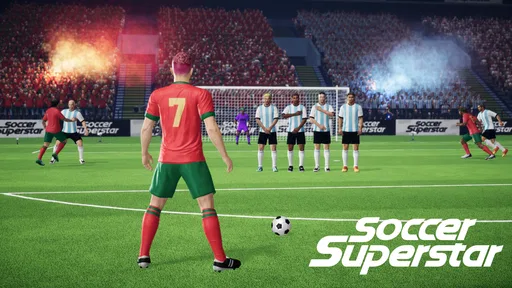
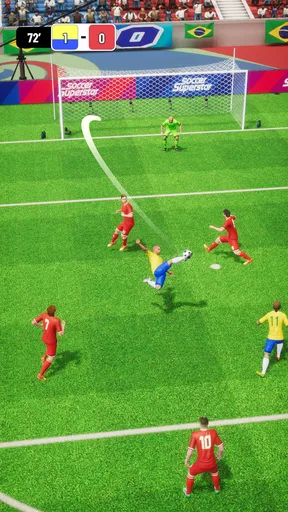
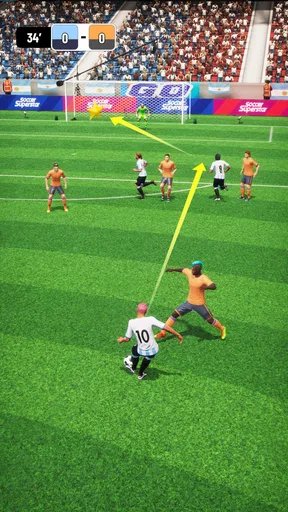
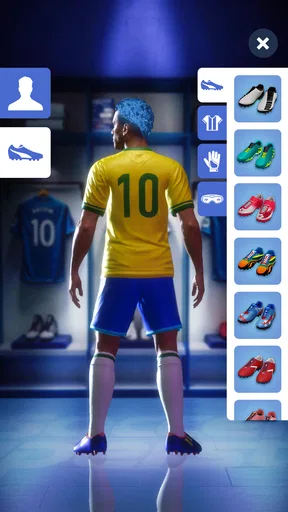

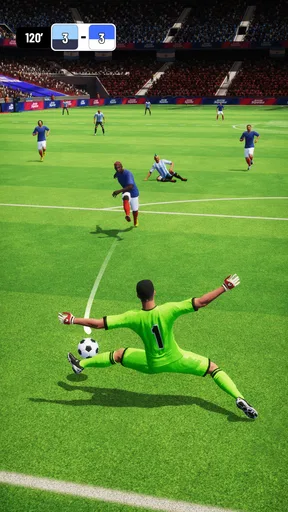
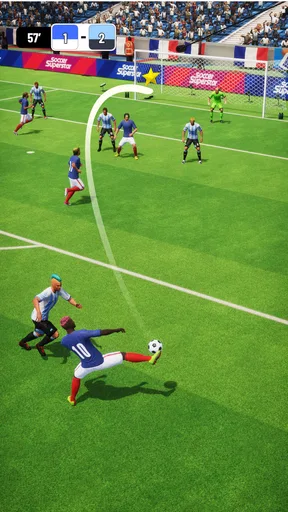
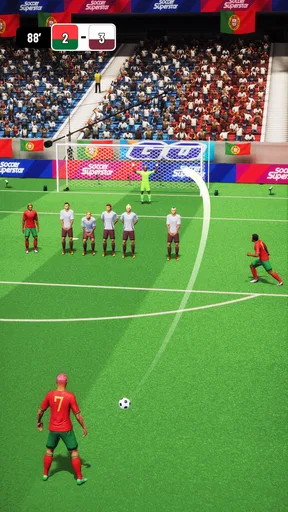
Our Review of Soccer Superstar
 Analysis by Appyee
When a level in Soccer Superstar stalls, my first instinct is to change the swipe rather than repeat it. This is a quick, moment-focused soccer game, so a small adjustment to direction or force can matter more than frantic input. That makes it satisfying when a pass opens a route, but it can also leave you wondering whether a failed attempt came from your aim or from the situation on screen.
I find it helps to pause for a moment before swiping. Look at the available path, decide whether the next action should move the ball toward a teammate or goal, then make one deliberate gesture. If a shot keeps missing, vary the angle instead of simply swiping harder. Treating each attempt as a small experiment is more useful than trying the same motion repeatedly, especially once the challenges become less forgiving.
Simple checks before you play
The game is free to download, with optional in-app purchases priced from $0.99 to $24.99 per item. I’d begin by deciding whether I’m happy to progress at my own pace before spending anything; a purchase is not a substitute for learning how the swipe responds. If you are setting it up for a younger player, its Everyone age rating is reassuring, while it is still sensible to discuss purchases before handing over a device.
On Android, the listed minimum operating system is version 6.0, and the current version is 0.3.48. If installation or launch goes wrong, I’d first check that the device has a compatible system version, that the download has completed, and that there is enough room for an app update. These basic checks are a better first move than assuming a particular level or control is broken.
Getting back into a level
If a session is interrupted, return to the game and see what state it opens in before making several rapid taps. When you retry a difficult moment, change one thing at a time—perhaps the line of a pass, then the shot angle—so you can tell what helped. That method is especially useful when a goalkeeper blocks a shot: a different route may be more valuable than a stronger attempt.
For a short break, the level-based format is convenient because I can focus on one challenge rather than commit to a full match. I’d still avoid starting a tricky level when I need to stop immediately; a little attention makes the swipe-based decisions more enjoyable, and interruptions can break the rhythm of working out a solution.
When a problem may be elsewhere
Because I can play without an internet connection, a weak signal does not have to end every session. If something that depends on connectivity appears unavailable, though, I would check the connection before repeatedly restarting the game. Offline play is useful for travel and patchy Wi-Fi, but it does not mean every online-related function will necessarily behave the same way without a network.
If the controls feel inconsistent, I’d also check whether my finger is making a clean swipe and whether I’m changing direction and force at the same time. A screen that is difficult to use, a device struggling with other apps, or a rushed gesture can all make a simple action feel unreliable. I prefer to test a clear, controlled swipe before concluding that the game itself is at fault.
The Gameplay Experience
Soccer Superstar brings a refreshing twist to the classic soccer game. It’s not about controlling the whole team at once but focusing on key moments that decide the match’s outcome. Picture this: you’re in the final minutes of the game, and you have a chance to make that winning goal. The game places you right in the action, and it’s thrilling!
The controls are straightforward and intuitive. You swipe to pass and shoot, which might sound simple, but the challenge ramps up as you progress. The swiping mechanics are surprisingly satisfying, and you’ll find yourself experimenting with different angles and strengths to outsmart the goalie.
Features That Stand Out
One feature that really stood out to me is the game’s offline capability. You don’t need to be connected to the internet to enjoy it, which is perfect for those moments when you’re on the go or have spotty Wi-Fi.
Moreover, the graphics are sharp, and the animations are smooth, enhancing the overall experience. The game captures the essence of soccer with its realistic stadiums and crowd reactions, making you feel like a real soccer star.
And let’s not forget the career mode, where you can climb the ranks, starting as a rookie and working your way up to become a soccer legend. It’s highly addictive and keeps you coming back for more.
Why You’ll Keep Coming Back
One of the reasons I keep coming back to Soccer Superstar is the sheer number of levels and challenges. Each level brings something new, whether it’s a tricky defense or a challenging goalkeeper. It keeps the gameplay fresh and engaging.
Plus, the game doesn’t bombard you with ads, which is a big plus for me. You can enjoy your game time without constant interruptions.
Another cool aspect is the customization options for your player. You can change your player’s appearance, from hairstyles to jerseys, which adds a personal touch to your gaming experience.
Choosing the right kind of soccer game
I’d recommend this to someone who likes the decisive moments of soccer more than managing every player across a full pitch. Its swipe-led passing and shooting make it approachable when you have a few minutes, and its progression through more than 100 levels gives those short sessions a clear next goal. It is a different kind of sports game from a conventional match simulator: you focus on selected attacking situations rather than steering an entire team through every phase of play.
That focus is also the main trade-off. If what you want is the freedom to build attacks from the back, switch between players, defend continuously, or control a complete match, this is not the substitute I’d choose. A full team-based soccer game is a better fit for that. Here, the pleasure comes from reading a brief situation and finding a useful line for a pass or shot; players who enjoy tactical control over the whole field may find the narrower scope limiting.
It suits casual players, soccer fans who want a lightweight diversion, and anyone who enjoys improving through repeated attempts. It may suit younger players too, though I’d still keep the optional purchases in mind. I’d skip it if I strongly dislike swipe-based controls, expect deep squad management, or want every session to feel like an uninterrupted real-time match. Knowing that distinction before installing makes it easier to judge the game on what it actually emphasizes.
A practical rhythm for short sessions
A realistic use for me is opening it while waiting for a takeaway order or sitting through a short commute where I can safely use my phone. I can play a level, put the device away, and return later without needing to set aside time for a full match. The best use case is a brief, focused break—not playing while walking, crossing a street, or doing anything that needs attention. The levels reward concentration, even though the individual actions are simple.
For a better feel for the swipes, I’d keep my first few attempts measured and compare the result of one adjustment at a time. If a pass reaches the wrong area, change its direction; if the route is sensible but a shot is stopped, try a different angle. This is not a guarantee that every level will yield immediately, but it turns retries into useful feedback rather than a string of guesses. It also helps me decide whether I’m enjoying the puzzle-like challenge or just repeating a motion out of frustration.
The career progression gives those isolated moments a broader sense of movement, while customization is a lighter way to make the player feel more personal. I would treat appearance changes as a bonus rather than the reason to install: the real test is whether solving the next situation feels rewarding. Likewise, the offline option is particularly handy when I know the connection may drop, but I would not plan around every network-dependent element being available in that state.
What to expect before committing
Real Freestyle Soccer is the developer behind this sports game. It was released on September 28, 2020, and its 4.7 average comes from around 2.9 million ratings, with about 26,000 written reviews and over 100 million installs. Those figures show that the game has reached a broad audience, but they do not mean its particular style will suit everyone. The best test is whether you enjoy its compact, swipe-driven challenges rather than whether you usually play soccer games.
For a free game, I appreciate being able to try the central loop without paying upfront. I’d approach the in-app purchases as optional spending, not as a necessary shortcut, and decide what I think after playing at my natural pace. If a level is frustrating, take a break or rethink the route before spending money; the core appeal is making a better decision with the swipe, not buying a different kind of soccer experience.
On iOS, I’d check the current store requirements on the device before downloading; on Android, the stated minimum is version 6.0. If a download or update does not finish, the sensible first checks are the device’s available space, its connection, and whether the operating system meets the requirement. If the game opens but a particular action feels off, I’d test another controlled swipe and distinguish a one-off gesture from a persistent issue before deciding to reinstall.
Final Thoughts
All in all, Soccer Superstar is a fantastic choice for soccer fans and casual gamers alike. It’s a game that’s easy to pick up but hard to put down. Whether you’re waiting for your coffee or just chilling at home, it’s a great way to enjoy some quick soccer action. So, lace up your virtual boots and give it a try!
My practical verdict is that I’d recommend it when you want compact soccer challenges, a clear progression path, and the option to play offline. I would not pick it as my main soccer game if I wanted full-match control or detailed team tactics. But when I have a few spare minutes and feel like working out the right pass or shot, its focused format is an appealing change of pace.
Privacy and Permissions
See what permissions an app requests and how it handles your data.
- Photos/Media/Files
- read the contents of your USB storage, modify or delete the contents of your USB storage
- Storage
- read the contents of your USB storage, modify or delete the contents of your USB storage
- Wi-Fi connection information
- view Wi-Fi connections
- Other
- view network connections, full network access, control vibration, prevent device from sleeping, Google Play license check
Verdict
Strengths of Soccer Superstar
- Intuitive controls make gameplay easy.
- Offline mode available for on-the-go fun.
- Challenging levels keep you engaged.
- No pay-to-win mechanics.
- Regular updates with new features.
Limitations of Soccer Superstar
- Graphics could be more polished.
- Ads can be slightly intrusive.
- Limited customization options.
- Repetitive music tracks.
- In-app purchases can be pricey.
Similar Picks in This Category
View All
8 Ball Pool
Miniclip.com4.8

Pooking - Billiards City
AIM TOP GAME TECHNOLOGY LIMITED - pool4.6

Carrom Pool: Disc Game
Miniclip.com4.4

EA SPORTS FC Soccer Mobile 26
ELECTRONIC ARTS4.6

World Soccer League
mobirix4.3

Soccer Cup 2026: Football Game
INLOGIC SPORTS - football tennis golf soccer4.3
You May Also Like
View All


Frequently Asked Questions
What is Soccer Superstar, and how is it played?
Soccer Superstar is a mobile soccer game that combines realistic gameplay with strategic elements. Players aim to score goals by drawing the trajectory of the ball, focusing on timing and precision. It's designed for both casual and strategic players, offering a satisfying experience without complex controls.
Is Soccer Superstar free to play?
Yes, Soccer Superstar is free to download and play. However, it includes optional in-app purchases that can enhance the gaming experience, such as unlocking new levels or customizing players. These purchases are not necessary to enjoy the core game, but they can offer additional content and features.
What are the system requirements for Soccer Superstar?
Soccer Superstar requires Android 5.0 or higher and iOS 10.0 or later. The game is optimized for smartphones and tablets, ensuring smooth gameplay across a range of devices. It’s recommended to have adequate storage space and a stable internet connection for optimal performance.
Does Soccer Superstar require an internet connection to play?
Soccer Superstar can be played offline, making it ideal for gaming on the go without needing a constant internet connection. However, certain features, such as updates and some multiplayer elements, may require online access. Playing offline does not limit the core gameplay experience.
Are there any age restrictions for playing Soccer Superstar?
Soccer Superstar is suitable for players of all ages, featuring content that is family-friendly. However, due to the competitive nature and strategic elements, it is recommended for players aged 4 and up. Parents may want to monitor in-app purchases if younger children are playing.
Play our best games!


